Monday, March 2, 2009
TPACK!!!
Plot a time line of the key events of the Revolutionary War.
Pedagogy:
The aim of this lesson is to encourage the students to be independent in the learning process. They will be guided through it, yet most of it will be structured in such a way that the students will be the ones making the discoveries. As these students make observations, they will be able to analyze information. Through the virtual tour, they will be able to identify important locations of significant battles fought during the Revolutionary War. The students will be assessed in the forms of writing personal poems, participating in a play, making dioramas, and participating in debates. These activities will be both engaging and fun for the students, as they will teach them to search for answers predominantly on their own. Finding such answers will prove to be far more meaningful to the students than merely teaching them through direct instruction. This pedagogy will enable to students to accomplish the tasks outlined in the standard's objective. They will actively participate in constructing a thorough time line through the activities they participate in throughout the process.
Technology:
Google Earth will be used to conduct this virtual tour for the students. This program will be used to plot the locations of the important battles fought during the Revolutionary war. These locations will be put together in the form of a tour, which will provide the students with a cohesive understanding of the material. Google Earth makes teaching such information affordable, time-efficient, and fun! It enables the students to feel like they are there without actually being there. It will present them with a field trip like no other! This program also plots out the locations in a way that helps students to easily be able to locate them on a map. Finally, the locations of the tour will follow a logical sequence- they will be shown in a sequence that follows a chronological outline. This will assist the students in remembering which events came first, second, third, etc.
Tuesday, February 24, 2009
Virtual Tour
| Location (Battles) | Activity | Google Earth Content |
| 1. Lexington and Concord (Arlington, Massachusetts; Middlesex, Mass). | Read the poem, "Paul Revere's Ride" by Henry Wadsworth Longfellow. After reading the poem, students will write their own poem about either the battle of Lexington and Concord or Paul Revere. | Picture |
| 2. Ticonderoga (Ticonderoga, NY). | Participate in a play where no shots are fired in the seizing of the British fort, Fort Ticonderoga. The students could be put into groups that learn in depth about the people who led the battle, participated in it, etc. | Picture |
| 3. Saratoga (Saratoga, NY). | Make a diorama or poster depicting their favorite part of the battle at Saratoga. | Picture |
| 4. Valley Forge (Valley Forge, Pa). | Debate between Washington and his troops (he wanted them to persist and not give up when they were going through a hard time). Some of the troops did not want to keep going. | Picture |
| Details of image overlay / path / polygon: | Polygon- I'm going to use it to connect all locations. | |
Tuesday, February 10, 2009
Martin Luther King Documentary Video!
I want to make sure that one thing is cited in my video, which I neglected to mention in my references page at the end of it. The music I used is called "October Sunset" (2:32) - Found on Pop Vol 1. I got this song from http://www.freeplaymusic.com/. The link for the page I got it on is: http://www.freeplaymusic.com/search/category_search.php?t=f&i=9
Here is my video! Enjoy!
Monday, February 9, 2009
Storyboard for Martin Luther King Jr. Documentary


Content: 6th grade Language Arts Standard 8, Objective 6: Produce informational texts (biographies) through viewing medias. I decided to do a teacher-centered lesson in order to teach my students about the life of Martin Luther King Jr. However, this lesson could be altered if needed, in order to foster personal learning within the students.
Pedagogy: I chose to do a biographical documentary on the life of Martin Luther King Jr., which ties into Language Arts as well as Social Studies. The students are able to develop an understanding of how to write a biography about a person- whether that person is a family member, friend, famous author, or historical figure- the students are able to acquire an understanding of how to complete such a process.
Technology: This project will make use of PhotoStory. This program is free and provides teachers with an easy way to create movies to show in their classroom. Not only can teachers use it, but students can benefit from using this program as well. It provides students with ample opportunities to experiment and learn information firsthand.
Monday, February 2, 2009
Week 4
Tuesday, January 27, 2009
A Science Project That is Off the Hizzle!!!!


Dear fellow teachers and administrators, welcome to Tech Savy Teacher! Recently in my classroom, I planned an activity for my 6th grade class that was convenient and easy for both the students and me. My class explored the phases of the moon using a program called Stellarium. The learning objective for this activity can be found on the Utah Core Curriculum website under the category of Science. It is found in standard 1, objective 2.
For those of you who are unfamiliar with Stellarium, I will explain what this program is and how to utilize it in your own classroom. Stellarium is a scientific program used to explore the various parts of the solar system. For this particular assignment, the students observed the phases of the moon. However, depending on your solar system course objective, you could use this program to explore the planets, constellations, and their corresponding zodiac signs. The sky is the limit!
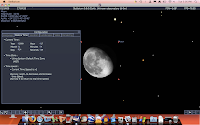
The pictures I have provided will be of help to you as you practice and prepare to use Stellarium in your own classroom. Searching for and locating the different phases of the moon was so intriguing and effortless on Stellarium! Here is a list of the steps I followed to complete this project:
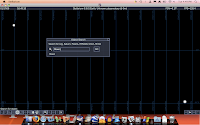
Step #1: Click on the Stellarium program and click on the “Search for Object” box. A display box will pop up as shown. I entered in the moon, which can be seen in the picture above. Please refer to the pictures throughout this article, as they are a great reference for you to use if you or your students get confused or uncertain about how to get to the next step in this program. They provide you with a visual representation of what each step looks like.
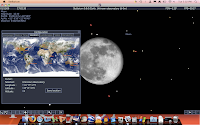
Step #2: Push the function key and page up at the same time in order to zoom in on the picture of the moon provided.
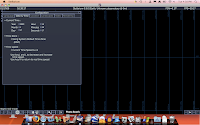
Step 3: Click on the “Configuration” display box and go to “date and time” tab. In the day slot, you have the ability to type in each day of the month (remember, it takes 28 days for the moon to complete its phases). There is an “up” arrow that you can use if you wish to go to a later date- you can scroll in order to do that. Or you can use a “down” arrow to go to an earlier date. The choice is yours! Experiment with it and get a feel for it.
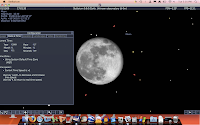
Step 4: I included pictures of various phases of the moon. The Full moon, Waning Gibbous, and Third Quarter are shown above. If the student would like, they have the ability to change the place from which they are viewing the moon (i.e. different states, countries, or views of the moon). This can be done by going to the “location” tab in the “Configuration” display box and changing it to whatever your little heart desires!
Stellarium is truly a program that is extremely beneficial to teachers and students alike. One advantage of this program is that is time-efficient. Rather than assigning your students to go out every night, draw the moon, and record their observations, this program enables them to perform this same task in a fraction of the time. The students are able to scroll through each day of the month and thus, have the ability to see all of the phases of the moon in a matter of minutes. Not only is this program time-efficient, but it is also helps students to be more excited and engaged in the content they learn. Observing the moon every single night could prove to be boring for the students. Thus, this program keeps their attention, helps them to focus, and as a result of not having to observe for a long span of time, makes it more interesting for them. Another benefit to this program is that it is not affected by weather or gang violence. Students may be unable to go outside to observe the moon due to inclement weather or they may live in a dangerous neighborhood, which prevents them from being able to go outside of their home at night due to gang violence. An additional benefit that this program provides is that of helping students to view the phases of the moon in different states and countries. From this program, students can record their own observations and come to the conclusion that every state in the United States and every country goes through the same sequence of the moon phases. A final advantage of this program is that it makes the process of exploring the moon more personal to the student. The student is able to view the phases of the moon in a short time right in front of his or her own eyes on the computer screen. They are in control of their research, observation, and the conclusions they arrive at. As a result of this independence on the computer, Stellarium provides students with a meaningful use of technology, which further enhances their knowledge in Science. The children will love it and so will you!
Monday, January 26, 2009
Just call me 'TPACK' g-unit!
TPACK stands for "Technological Pedagogical And Content Knowledge." It may sound like a mouthful, but in reality, it is not a complex subject. Prof. Burgoyne first began teaching this topic by talking about each of the knowledge types and helping the students in my class to understand what they meant and how they related to teaching. Pedagogical knowledge can be defined as knowledge that deals with teaching methods, classroom management, assessment, child development and age- appropriate activities, etc. Basically, it deals with the study of teaching. Content knowledge can be defined as knowledge about a particular domain (i.e. the Utah core curriculum- any subject could be considered a domain in content knowledge). Technological knowledge is knowledge of software, hardware, windows or Mac, file formats, programming, etc. TPAC is especially interesting because it combines all of the knowledge types mentioned above into one. The teacher uses technology, pedagogical knowledge, and content knowledge in their classroom. For example, a teacher may use Microsoft Excel [technological] to teach students about collecting data in math [content] and converting it into various charts. Throughout this assignment, the students would ask their own questions (inquiry) [pedagogical] about the data.
It is vital that teachers have all three of the types of knowledge so that they can teach in a manner that will help students to understand material in more than one way. By combining their technological, pedagogical, and content knowledge- the teacher is able to help their students achieve success in the classroom.
I had a fun time using the temperature rods in class this past Monday (Jan. 19, 2009). This was a fun way to explore science! It was amazing to see the temperature from my hands feeding right into the computer and constructing data right before my eyes! I believe that students could use this type of a project on a science fair project in which they measure how temperature correlates to the growth of plants. These temperature rods could prove to be a very effective method to recording large amounts of data, which the student could observe and record throughout the duration of their experiment.
